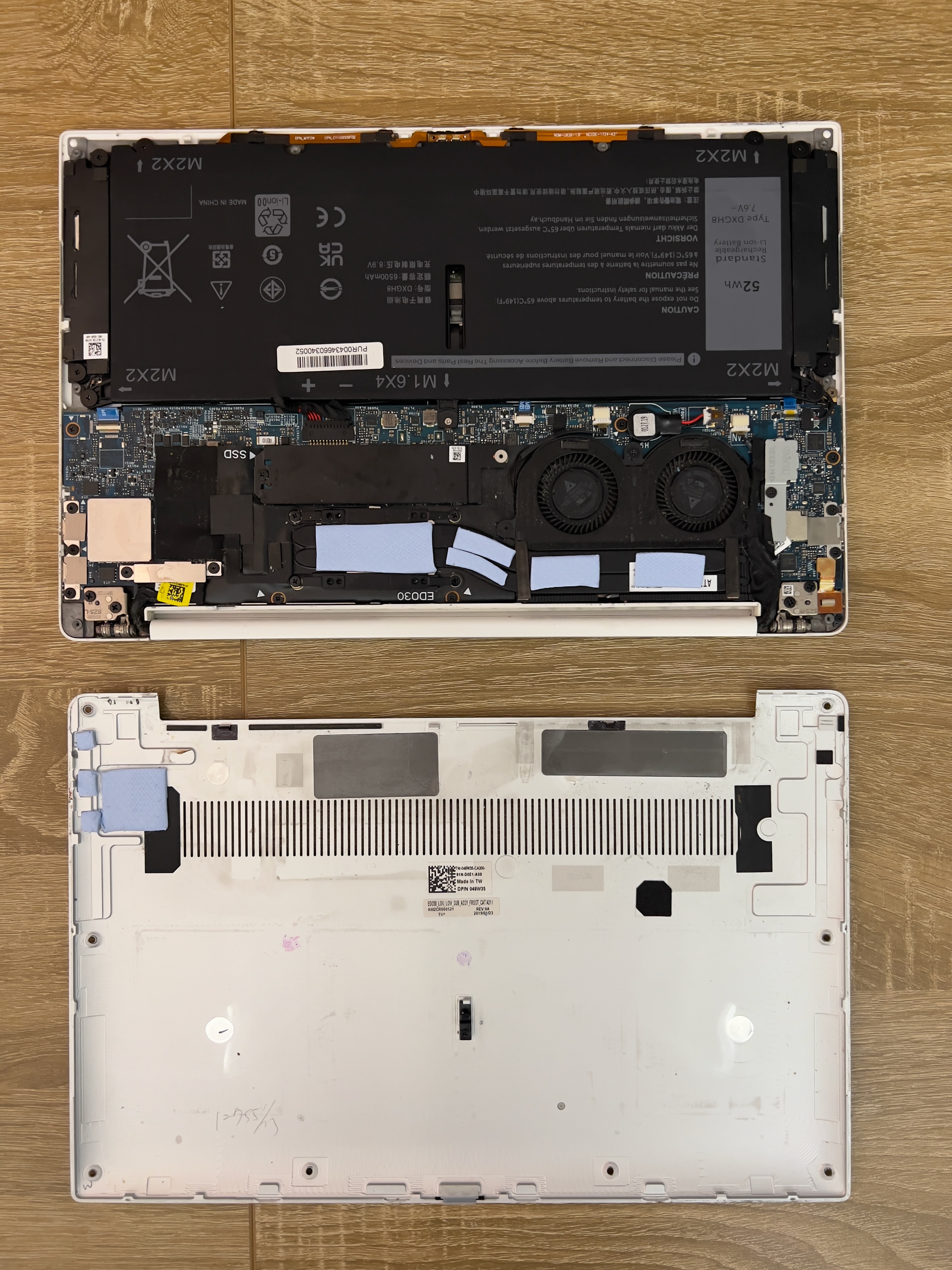
XPS-13 9380 Revival
My old XPS-13 9380 from college was not doing too great. Its battery lasted ~1.5 hrs, and it would get extremely hot with fans going at full blast, no matter what. I’d long since moved to using a MacBook Air as a daily driver, so I didn’t really need this laptop anymore. Rather than trying to sell or recycle the XPS, I figured it would be a great platform for learning Linux. I did a couple hardware fixes on the way there: new thermal paste underneath CPU/ GPU heatsink, thermal pads to transfer more heat to the bottom chassis, new battery unit, and finally a fresh Linux install.
Hardware Issues
The laptop had two main issues:
- Thermal throttle. The laptop was having obvious issues with heat transfer, having fans go at full speed constantly, and getting too hot on its backside.
- Battery life. Potentially related to the thermal issues, but battery life was ~1.5 hrs at best.
Hardware Fixes
Before changing the laptop OS to Linux, I wanted to address the hardware issues. My thinking was that it would be best to return the laptop to a healthy physical baseline, before adding in a new OS into the mix.
- New thermal paste: Disassembled the bottom chassis of the laptop, cleared out fuzz that was covering the thermal outtake, and took the heatsink off the CPU/GPU die. The original OEM paste had long since become a crusty dried residue, a clear indicator that it was doing a terrible job at conducting heat out to the heat pipe system. I applied some leftover thermal paste from the CPU cooler from my desktop build.
- Thermal pads: Scrolling online, it seems like a lot of people reported having thermal issues with XPS-13 laptops, even when relatively new. It makes sense, considering how much hardware is packed into such a small frame. I decided to address by adding thermal pads between the heat pipe system and the bottom chassis. While this could potentially make the chassis warmer, the tradeoff was worth it in my opinion. Opening a path for heat to flow to such a large thermal mass, with corresponding area, would do a ton for increasing overall heat flow from the CPU die to ambient. I used some Arctic TP-3 thermal sheet. I specifically chose these because of how soft they are: they’d be able to squish and conform when bridging the gap between the heat pipes and the chassis, instead of causing excess bowing/ deformation in the chassis.
- New battery: This was the most straightforward fix. The Dell XPS-13 9380 uses battery DXGH8, a 52Wh battery. I got this from iFixit, though it was cheaper at other retailers. if I’m going through the pain of swapping the battery out, I might as well pay for battery from a reputable supplier.
Taking the laptop apart (and putting it back together) was honestly not bad at all. I’d previously replaced the battery on my iPhone 13, and in comparison, the XPS-13 screws and connectors felt absolutely massive.
Software Fixes
My XPS-13 was running Windows 11, and honestly I had no real complaints on that front. I’d already done a full factory reset, so it was pretty zippy. However, I was unhappy with how much space Windows was taking, as well as the general lack of control. While there are some basic steps you can take to get some privacy back on Windows, it’s not an OS meant for privacy. There will always be a certain amount of telemetry you can’t control. Doing some research into making the change from Windows to Linux, Linux Mint Cinnamon felt like the right distro for me. While other options like Ubuntu or Fedora might be higher performant or more supported, Mint seemed easy to get started with. Getting Linux Mint running was a breeze, with the only interruption being that I had to turn off Intel Rapid Storage Technology (RST) before proceeding.
Looking back (and forth)
The laptop is noticeably faster, the battery life is leagues better, and while the temperature will occasionally spike, it’s not nearly as bad as it was before. I think my only grip right now is a certain lag or jitteriness in mouse movement and typing that I hadn’t seen with Windows. Raising the Cinnamon process priority helped a lot. This doesn’t seem to be an uncommon issue, however. I’m hoping that when Mint 23 releases this year with native Wayland support, the jitteriness will totally disappear. In the meantime, I’m still having fun getting used to using the CLI a lot more in comparison to Windows, and learning more about the fine-tuning of my Linux system.
Pics or it didn’t happen